Offensive Security Intro | TryHackMe Write-up
Complete walkthrough for Offensive Security Intro TryHackme room. Hack your first website (legally in a safe environment) & experience an ethical hacker's job.
This is my write-up for the TryHackMe room on Offensive Security Intro. Written in 2026, I hope this write-up helps others learn and practice cybersecurity.
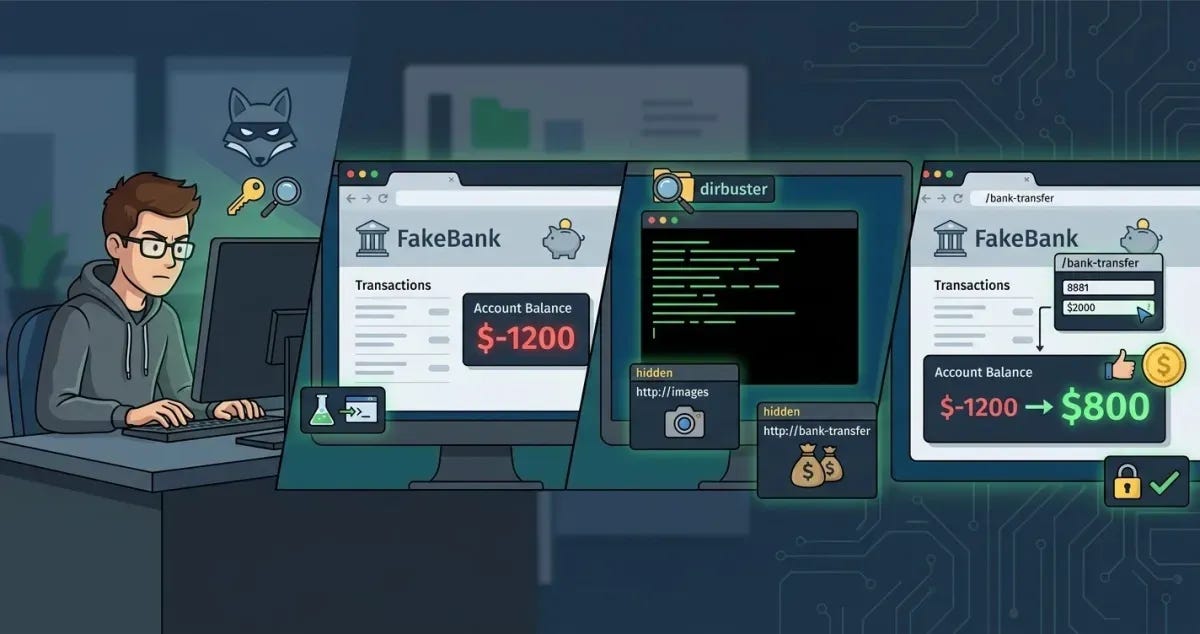
Task 1: Think like a Hacker
Offensive Security involves thinking like an attacker to identify and fix vulnerabilities before malicious hackers can exploit them. In this exercise, you will practice hacking a simulated website to understand the methods used by ethical hackers.
Which term describes simulating a hacker's actions to find weaknesses?
Offensive Security
Task 2: Starting the Lab
This task introduces the virtual desktop environment used for the simulation. You will be targeting a simulated banking application called FakeBank, which automatically opens in the lab's browser.
What is the bank account number in the FakeBank application?
8881
Task 3: Find Hidden Pages
A common web vulnerability is leaving hidden administrative pages accessible. You will use a terminal-based hacking tool called dirb to find these pages. By running the command dirb http://fakebank.thm, the tool will scan the website and reveal hidden directories marked with a +.
Dirb found one URL, http://fakebank.thm/images. What is the other hidden URL?
Task 4: Attack the Admin Page
Using the hidden URL discovered in the previous task, you can access an admin panel that allows you to transfer funds. By navigating to the /bank-transfer page, you can input your account number (8881) and deposit $2000 to successfully manipulate your account balance.
When your balance turns positive, a pop-up with green text appears. Enter the green words as the answer (ALL CAPS)
BANK HACKED
Thanks for reading. See you in the next lab.


